Your Trip Planning Tool Stack Is More Complex Than It Needs to Be
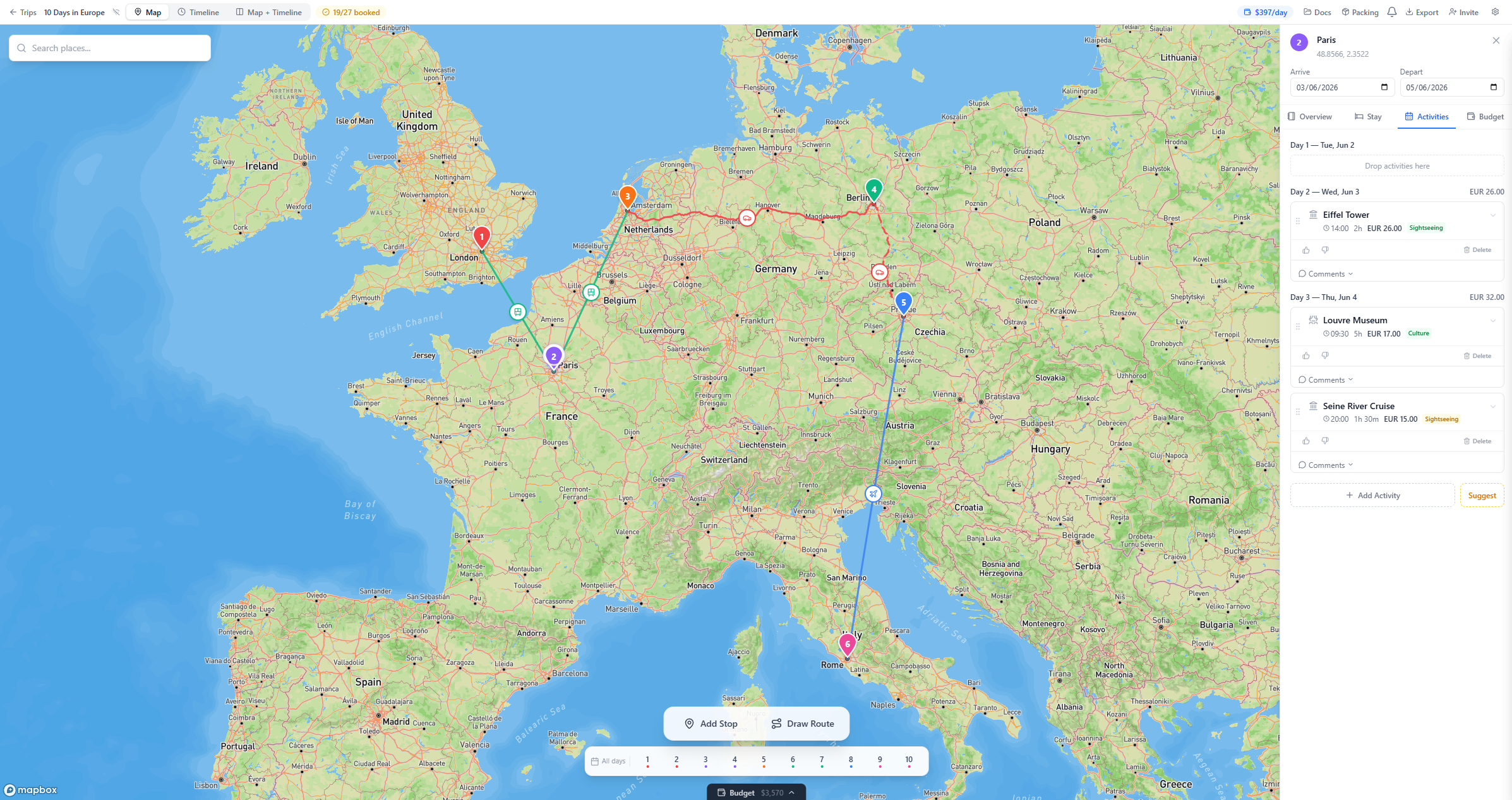
Most travelers use 4–5 separate tools to plan a single trip — a map app for routes, Splitwise for costs, Google Sheets for the itinerary, and WhatsApp to coordinate. The problem isn’t any individual tool; it’s the fragmentation between them. A single trip planner that combines map-based route planning, multi-currency budget tracking, and group collaboration eliminates the data duplication and app-switching that makes planning feel like work.
If you’re like most travelers, your stack looks something like this: Wanderlog or Google My Maps for the route, Splitwise for splitting costs, Google Sheets for the master itinerary, and WhatsApp for coordinating the whole mess. Maybe throw in TripIt for flight tracking.
As one Redditor put it: “I use Wanderlog for the actual route because the map view is clutch. For the money side, Splitwise is non-negotiable.” And for everything else? Google Sheets. Because “Google Sheets is a godsend.”
Except… it’s not.
The fragmentation problem
Each tool in your stack does one thing well. Wanderlog has a decent map view. Splitwise handles expense math. Google Sheets is flexible. But none of them talk to each other, and the gaps between them are where trip planning breaks down.
Your route is in one app. Your budget is in another. Your group’s decisions are buried in a chat thread. Nobody has the full picture. And one person — the planner — has to hold all three pieces together in their head.
That person becomes the “unofficial accountant” — tracking costs in Splitwise, updating routes in Wanderlog, maintaining the master spreadsheet, and copy-pasting between them. Everything must be entered manually. Twice. In different apps.
By day 3 of planning, the admin is draining.
Why people stick with the stack
If it’s this painful, why does everyone do it? Three reasons:
-
No single tool did it all. Until recently, there wasn’t a trip planner that combined map-based route planning, budget tracking with multi-currency support, and group collaboration. So people built Frankenstein stacks from whatever was available.
-
Status quo bias. You’ve used this stack for your last three trips. It’s painful, but familiar. Switching feels like more work than enduring it.
-
Each tool is good at its one thing. Splitwise IS the best expense splitter. Google Sheets IS infinitely flexible. The problem isn’t any individual tool — it’s that you need four of them.
What “one tool” actually means
Plot a Trip combines the three things travelers cobble together from separate apps:
Route planning on a real map. Not a list with a map sidebar — a full-screen interactive map where you drop pins and draw color-coded routes. Driving, walking, cycling, transit, and flights. See your entire trip as a visual route so you catch the 6-hour backtrack before it costs you a travel day.
Budget tracking with multi-currency. Log expenses in Thai baht, convert to euros, split with your group. Live exchange rates, no spreadsheet formulas. No switching to a second app.
Group collaboration. Everyone sees the map, adds stops, votes on activities, and sees what it costs. No more being the middleman between 4 different apps. No more chasing people for money.
One trip. One tool. One view of what’s happening.
What it doesn’t replace (yet)
Honesty matters: Plot a Trip doesn’t have Wanderlog’s AI destination suggestions or curated guides. It doesn’t have TripIt’s email parsing for booking confirmations. And there’s no native mobile app yet (mobile web works, native is coming).
If AI recommendations and a mobile app are dealbreakers for you, Wanderlog might be the better fit right now. But if your core frustration is the fragmentation — switching between 3 apps, entering data twice, being the unofficial accountant — Plot a Trip solves that.
The stack is the problem
Your trip planning tools aren’t individually broken. The stack is. The cognitive cost of switching between 4 apps, maintaining 4 separate data sources, and manually bridging the gaps between them is the real planning tax.
One map. One budget. One place for your whole group. Start free.
Related reading: If you’re planning a European trip, check out our top 5 must-see cities on your euro trip and tips on how to balance budget and experience in your itinerary.